
Download Rick and Mortify – AI Storyboard Generator for Rick and Morty Fans
Overview
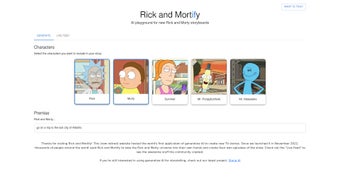
Rick and Mortify is an innovative, AI‑powered web application that lets enthusiasts of the cult classic series Rick and Morty create original storyboards in minutes. Built by Julia Turc and Mihail Eric, the tool blends natural‑language processing with a deep understanding of the show’s characters, humor, and sci‑fi tropes. Users start by selecting beloved characters such as Rick, Morty, Summer, Beth, or even side‑kicks like Mr.
Meeseeks, then type a brief premise—anything from “Rick invents a portal gun that only works on Tuesdays” to “Morty discovers a hidden dimension of sentient pizza.” The AI instantly expands that seed into a full‑fledged storyboard, complete with scene descriptions, dialogue snippets, and visual cues. A live feed shows the storyboard as it forms, giving creators instant feedback and the ability to tweak lines or plot twists on the fly. Once satisfied, the storyboard can be shared via a unique URL, enabling fans to collaborate, showcase their work, or simply brag to fellow viewers.
Because it runs entirely in the browser, there’s no need for heavyweight installations, and the interface is optimized for both desktop and mobile browsers, making it a convenient playground for casual fans and aspiring writers alike. Security‑focused developers have ensured that user data never leaves the session unless the creator explicitly shares a link, preserving privacy while still encouraging community interaction.
Key Features of Rick and Mortify
- AI‑Driven Storyboard Generation: Harnesses GPT‑style language models trained on the show’s scripts to produce coherent, on‑brand dialogue and plot points.
- Character Picker: Choose from the full roster of main and supporting characters, each with unique voice presets that influence tone and humor.
- Premise Input Box: Start with a single sentence or a short paragraph; the AI extrapolates a multi‑scene storyboard in seconds.
- Live Preview Pane: Watch the storyboard evolve in real‑time, edit lines on the spot, and reorder scenes with drag‑and‑drop.
- Shareable Link Generator: One‑click creation of a permanent URL that lets others view, comment, or fork the storyboard.
- Cross‑Platform Accessibility: Fully responsive design works on Windows, macOS, Linux, Android, and iOS browsers without additional plugins.
- Export Options: Download the storyboard as a PDF, JSON, or plain‑text file for offline editing or printing.
- Community Gallery (Roadmap): Planned feature to browse publicly shared storyboards, rate them, and inspire new creations.
- Privacy‑First Architecture: No user accounts required; all data stays client‑side unless explicitly shared.
- Regular Updates: The development team promises monthly model fine‑tuning to keep humor fresh and aligned with new episodes.
Installation, Setup, and System Compatibility
Because Rick and Mortify is a web‑based service, the installation process is as simple as opening a modern browser and navigating to the official site. The application is built with progressive web app (PWA) technology, allowing users to “install” it on their desktop or mobile device for a native‑like experience. Here’s a step‑by‑step guide:
- Visit the website: Open Chrome, Edge, Firefox, Safari, or any Chromium‑based browser and go to rickandmortify.example.com.
- Optional PWA installation: Click the “Add to Home Screen” button that appears in the address bar (or use the browser’s menu > “Install App”). This creates a shortcut that launches the tool in a window without browser UI.
- Create your first storyboard: Select characters from the sidebar, type a premise, and hit “Generate.” The AI begins populating the storyboard instantly.
- Fine‑tune your script: Use the inline editor to modify dialogue, adjust pacing, or add new scenes. The live preview updates in real time.
- Share or export: Click the “Share” icon to copy a unique link, or choose “Export” to download a PDF or JSON file.
The tool runs on the following operating systems, making it truly cross‑platform:
- Windows 10/11 (any modern browser)
- macOS Ventura and later
- Linux distributions with recent Chromium/Firefox builds
- Android 9+ (Chrome or Edge)
- iOS 13+ (Safari or Chrome)
Performance requirements are modest: a stable internet connection and at least 2 GB of RAM. Because the heavy lifting (AI inference) occurs on the provider’s cloud servers, even low‑end devices can generate complex storyboards without lag. Security is baked in via HTTPS, and the session token expires after 24 hours unless the user actively shares a link, ensuring that unpublished drafts are automatically cleared.
Pros, Cons, and Frequently Asked Questions
Pros
- Instant storyboard creation saves hours of manual writing.
- No software download; works entirely in the browser.
- Rich character voice models keep dialogue authentic to the show.
- Free to use with optional premium features planned for power users.
- Shareable links encourage community collaboration without needing accounts.
Cons
- Reliance on an internet connection; offline mode is not yet available.
- AI may occasionally produce jokes that miss the show’s specific humor style.
- Limited to characters and settings that exist within the current series canon.
- Export formats are basic; advanced formatting (e.g., storyboard panels) requires third‑party tools.
- Community gallery is still under development, so sharing inspiration is limited.
FAQ
Is Rick and Mortify really free?
Yes, the core storyboard generator is completely free. Future premium features, such as higher‑resolution export or advanced AI fine‑tuning, may be offered as paid add‑ons, but the basic experience remains without cost.
Can I use Rick and Mortify on a mobile phone?
Absolutely. The interface is fully responsive and works on Android and iOS browsers. You can even install it as a Progressive Web App for a native‑like feel.
How does the AI keep the dialogue true to the show?
The model was trained on a curated dataset of official transcripts, fan scripts, and character bios. It learns each character’s speech patterns, catchphrases, and typical comedic timing, which it then applies when generating new lines.
Is my data stored or sold to third parties?
No. All storyboard data stays client‑side until you choose to share a link. The service uses encrypted HTTPS connections, and no personal identifiers are collected without explicit consent.
Can I export my storyboard for printing?
Yes. The Export menu lets you download a PDF that formats scenes and dialogue for easy printing, as well as JSON or plain‑text files for further editing in other tools.
Conclusion & Call to Action
Rick and Mortify bridges the gap between fan creativity and cutting‑edge AI, delivering a playful yet powerful environment for anyone who loves Rick and Morty. Whether you’re a casual viewer looking to sketch a quick joke, a writer seeking inspiration for fan fiction, or a content creator wanting to showcase original episode concepts, the platform provides a fast, secure, and enjoyable solution. Its zero‑cost entry point, cross‑device compatibility, and shareable link system make it one of the most accessible storytelling tools on the web today. Ready to see your favorite characters embark on a brand‑new adventure? Visit the official site, generate your first storyboard, and share the madness with the community. Don’t forget to bookmark the page or install the PWA for instant access—your next interdimensional escapade is just a click away.



.png)



